

For DaVinci Resolve Studio
Grade with Engine, refine with Color Editor, finish with FX. Buy the Engine, add the Finishing Suite, or get everything in the Pro Bundle with 5 Signature LUTs.
Instant download · Lifetime license · Requires DaVinci Resolve Studio
Engine · Color Editor · FX
Real panels


Plugins & LUTs Demo
See flat log footage become a finished look, one step at a time.
The plugins
Three DCTLs for the Color page. Three nodes for the full grade, and you can keep your own nodes too.
01 · Grade
Converts, corrects and creates a cinematic look, with controls in one panel numbered in grading order.
Sold as LUTURY Engine ($40) and in the Pro Bundle.
02 · Refine
Precise per-color control, with a colored icon next to every slider.
Sold in the Finishing Suite (FX + Color Editor, $50) and in the Pro Bundle. Not sold alone.
03 · Finish
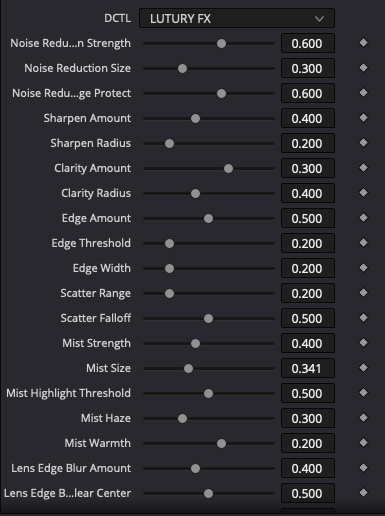
Texture, detail and stylize effects on one node. Every effect is off until you switch it on, and sizes scale with resolution.
Performance note: Noise Reduction (especially Kuwahara) and large Mist sizes are the heaviest effects.
Sold in the Finishing Suite (FX + Color Editor, $45) and in the Pro Bundle. Not sold alone.
LUTURY Engine
The Engine is node 1: it converts your footage, corrects it and adds film effects from one panel.
01
One panel with the controls in the order you grade: input and output first, then balance, tone, color and effects. Work from the top down.
02
Color space conversion, balance, tone and film effects are built in, so your node tree stays clean. Keep your own nodes for grain, noise reduction or a standard Rec709 CST.
03
Use Cineon film LUTs, outside or custom LUTs, or the LUTURY packs. Set the output to match, then add the LUT on the next node.
04
Pick your footage in Step 1A and your output in Step 1B. The conversion matches Resolve's own CST, so you don't need a separate CST node to start.
Engine controls
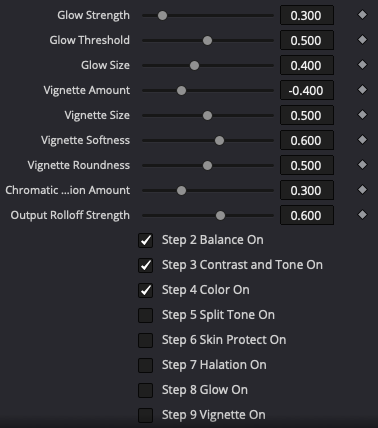
These are the real Engine panels in Resolve. The steps run top to bottom, and every section has its own on/off checkbox.

Step 1A
Sony S-Log3 (S-Gamut3 and S-Gamut3.Cine), Canon C-Log, DJI D-Log M (uses the bundled DJI LUT in the LUTURY Looks folder), Rec709, and DaVinci Intermediate / Wide Gamut.
Step 1B
Rec709 Gamma 2.4, Cineon Film Log for film LUTs, Sony S-Log3 S-Gamut3.Cine for S-Log3 LUTs, or DaVinci Wide Gamut.
Step 2
Exposure, temperature and tint.
Step 3
Contrast, blacks, shadows, highlights and whites.
Step 4
Saturation.
Step 5
Shadow and highlight hue and amount, plus balance.
Step 6
Keeps skin natural while you push the grade.
Step 7
Film-style red/orange glow around highlights: strength, threshold, size and warmth.
Step 8
Soft bloom: strength, threshold and size.
Step 9
Amount, size, softness and roundness.
Step 10
Subtle lens-edge fringing, with one amount control.
Step 11
Highlight Rolloff for a smooth film-like shoulder, and Match Resolve Look.
For grain, add Resolve's own Film Grain effect on a separate node.
Pro Bundle extra
The Pro Bundle includes 5 Signature LUTS. Use them on the node after the Engine. Engine and the Finishing Suite each include the Signature Pack of 5 LUTs.
Suggested node order
Node 1 grades (input and output conversion plus the grade). Node 2 refines color. Node 3 adds texture and finish. Add an optional LUT or grain node after.
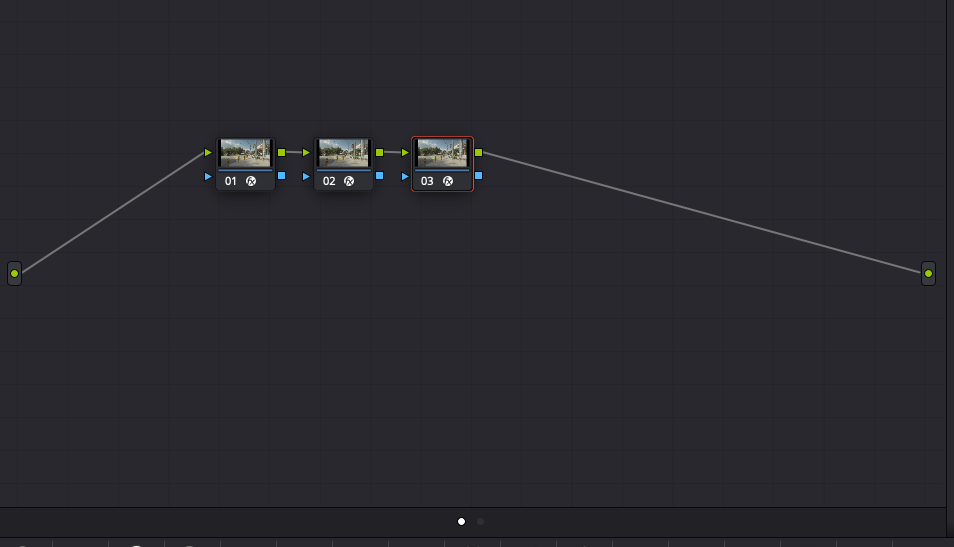
The real node tree in DaVinci Resolve Studio
Who it's for
Creators, editors and filmmakers who grade in DaVinci Resolve Studio and shoot on one of these.
Sony
Canon
DJI
Any camera
Requirement
All three plugins are DCTLs, and DCTLs only run in the paid Studio version of Resolve. They will not work in the free version.
Compare
What is included
LUTURY Engine
$40
Finishing Suite
FX + Color Editor
$50
Best value
Pro Bundle
$75
LUTURY Engine
✓
—
✓
LUTURY Color Editor
—
✓
✓
LUTURY FX
—
✓
✓
LUTURY LUTs
-
-
5 Signature Luts Included
Requires DaVinci Resolve Studio · All sales are final
Install
01
In Resolve, open Project Settings, Color Management, Open LUT Folder. Copy the LUTURY files in and restart Resolve.
02
On the Color page, add the DCTL effect to a node and choose a LUTURY plugin.
03
In the Engine, set Step 1A Input to your footage and Step 1B Output.
04
Work down from Step 2. Using a LUT? Add it on the next node, then Color Editor and FX after.
FAQ
Does it work in the free version of DaVinci Resolve?
No. All three plugins are DCTLs, and DCTLs only run in DaVinci Resolve Studio.
Does it run on Mac and Windows?
Placeholder: Mac / Windows support
Which version of Resolve Studio do I need?
Placeholder: minimum Resolve Studio version
What footage does the Engine support?
Sony S-Log3 (S-Gamut3 and S-Gamut3.Cine), Canon C-Log, DJI D-Log M, Rec709, and DaVinci Intermediate / Wide Gamut.
Can I use my own LUTs?
Yes. Set Step 1B Output to match the LUT: Cineon Film Log for film LUTs, Sony S-Log3 for S-Log3 LUTs, or Rec709 Gamma 2.4 for standard LUTs. Then add the LUT on the next node.
Does it work in HD and 4K?
Yes. FX sizes scale with resolution, so HD and 4K look the same. Noise Reduction (especially Kuwahara) and large Mist sizes may not play back in real time in 4K, but they render fine.
Does it replace all my other nodes?
No. The Engine puts conversion, balance, tone, color and film effects in one place, so you need fewer nodes. Keep your own nodes for grain, noise reduction or a standard Rec709 CST.
Is film grain included?
No. Add Resolve's own Film Grain effect on a separate node.
Which version should I get?
LUTURY Engine ($40) is the Engine plus the Signature Pack of 5 LUTs. The Finishing Suite ($45) is FX and Color Editor plus the Signature Pack. The Pro Bundle ($75) is all three plugins plus all 72 LUTURY LUTs.
Can I get a refund?
All sales are final, so please check what is included and that you have DaVinci Resolve Studio before you buy.
Everything in one toolkit: the Engine, Color Editor, FX and 5 Signature LUTURY LUTs.
Requires DaVinci Resolve Studio. DCTLs do not run in the free version. All sales are final.